USE THIS TEMPLATE TO REPORT A BUG OR ISSUE
📋 Describe the Issue.
-What exactly is happening?
-What were you doing before the issue occurred?
-When did the issue start? Was it after a specific update or event?
-Have you modified your game files or installed any mods?
⚠️ — If yes, remove all mods and reinstall the game
🔧 Troubleshooting Steps you have already tried, such as:
-Restart your PC
-Update your graphics card drivers
-Confirm that your PC meets the minimum system requirements
-Reset game settings by deleting the "v1", "v2", "v3", and "v4" folders located at:
%appdata%\..\LocalLow\Stunlock Studios\VRising\Settings
(Copy/paste this path into your File Explorer)
-Verified game files via Steam:
Steam > Right-click on V Rising > Properties > Local Files > Verify Integrity of Game File
🌐 Server Information:
-Is the server: Official / Public, Non-Official / Private
-Are you the host? Yes / No
🆔 Discord ID for us to reach out: Optional
Comments: 94
Oldest
•
Newest
•
Most likes
•
Fewest likes
-
26 Apr, '25
KHighlighted comment
📋 Describe the Issue.
-no response from remote host issue when opening single player session
-the issue has started since 1.01
-no modifications, this was the first time opening the game since december 2024
troubleshooting attempted -
-Restarted PC
-Updated graphics card drivers
-Confirm that your PC meets the minimum system requirements
-Reset game settings by deleting the "v1", "v2", "v3", and "v4" folders located at:
%appdata%\..\LocalLow\Stunlock Studios\VRising\Settings
(Copy/paste this path into your File Explorer)
-Verified game files via Steam:
Steam > Right-click on V Rising > Properties > Local Files > Verify Integrity of Game File
- reset json files
🌐 Server Information:
-Is the server: Private
-Are you the host? Yes -
25 Apr, '25
Ruth Dominguez Admin✅ Example Report:
After the new update on April 28, I can no longer use the Shadowbolt spell.
The issue began right after I exited the starting graveyard. Before that, the spell worked normally against enemies inside the graveyard. Now, every time I use it, the game shuts down instantly without any error message or crash notification.
Troubleshooting tried:
-Restarted PC
-Updated graphics drivers
-Verified game files on Steam
-I have not modified any game files or installed mods.
This occurs on a Private Server, where my friend is the host.
Discord ID: RuthD -
25 Apr, '25
EduardWhat happened to the previous bug reports as the list was not small and some weren't fixed?
-
28 Apr, '25
Daniel KAfter I updated my dedicated server it added a v4 file and when I start my server it loads a new save file and everyone is back to creating their character
when I try to move my save files over it crashes everytime with the error below
-window server
-setup through steamcmd
-updated through steamcmd
-
29 Apr, '25
Nickmy files are lost after the actualization of April 28th, after the last update i lost my game file and I only have the options to create a new character.
-
29 Apr, '25
JusteCatSince i start to look after the archievements on steam to complete them all.
I noticed this bug last November and it's still not fixed. The issue is that i cannot have the "dressed to impress" archievement and no matter what I try to do to get it, it doesn't want to complete itself. -
29 Apr, '25
Ray-What exactly is happening? Can not use hours and hours of game play save to play on the new DLC. You can't expect me to start from scratch again, I might need a refund
-What were you doing before the issue occurred? Downloaded your DLC
-When did the issue start? Was it after a specific update or event? Right after your DLC release.
-Have you modified your game files or installed any mods? No
Fix it! No game on earth rips people off and should let us transfer the save to the New DLC. -
29 Apr, '25
Corentin-What exactly is happening?
Can't connect to the servor where I played for a lot of hour yesterday. It say's 'Error : servor full' but the servor is not mentionned full when I log. My friend can come in or out when I can't enter.
-What were you doing before the issue occurred?
Nothing. Seem's like it's related to ur maj last maj from today ?
-When did the issue start? Was it after a specific update or event?
Today after MAJ.
-Have you modified your game files or installed any mods?
⚠️ — If yes, remove all mods and reinstall the game
No
Troubleshooting tried:
-Restarted PC - Yes
-Updated graphics drivers - Yes
-Verified game files on Steam - Yes
-I have not modified any game files or installed mods. - Yes -
30 Apr, '25
Boosette- I'm playing on Brutal for the second time (first time didn't completed the second act or anything further) in the new patch 1.1, After killing the new boss Sir Erwin the Gallant Cavalier it triggered the achievement of killing Octavian the Militia Leader.
- I'm not using mods.
-
30 Apr, '25
Enlox📋 Issue with the King's Throne
A friend disconnected while using the in-game King's Throne.
After the disconnect, no one else in the group could:
-Send minions (or workers) to collect resources.
-Interact with or move the throne.
-Displace the disconnected friend's character from the area as he was stuck to the particular place.
🌐 Server Information:
-Is the server: Official --> Server officiel 1080
-Are you the host? No -
30 Apr, '25
InsomniBonjour
Je ne peu plus lancé le sort Volute sanguine, le sort ce lancé pourtant très bien et d'un coup plus moyen de le lancé parfois le sort reste bloqué sur 6 second de temp de recharge et meme quand le temp de recharge est terminé impossible de le lancé je peu lancé tout les autres sort sauf celui la.
J'ai redémarré le jeux le pc et vérifier l'intégrité des fichier du jeux mais le problème persiste -
30 Apr, '25
BenUpon login since the update, when I enter the server my character moves slowly, and everything is choppy.
The issue began after the first Hotfix and has continued since, requiring me to restart the game frequently, though that doesn't always work.
-I have updated my drivers
-restarted the game
-verified all my files
-my PC is top of the line
-this occurs on a rented server from G portal that my friend operates
🆔 Discord ID for us to reach out: Thetemplar1 -
30 Apr, '25
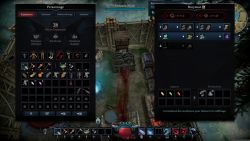
Sillahimpossible to grind a gem, the game accepts grinding from 2 gems contrary to what is displayed
-
30 Apr, '25
ErikAfter the Invaders of Oakveil update I can no longer play the game as it crashes shortly after pressing te play button on seam
-
30 Apr, '25
Kreistor-What exactly is happening?
Sir Erwin the Gallant Cavalier is ignoring all distraction Spells. This includes Dash, Mosquito, and Army of the Dead. All attacks always target the player and never switch to distractions.
-What were you doing before the issue occurred?
Fighting the Boss. Repeatedly.
-When did the issue start? Was it after a specific update or event?
Every time.
-Have you modified your game files or installed any mods?
No mods at all.
🔧 Troubleshooting Steps you have already tried, such as:
This is an AI issue, not technical. No troubleshooting can fix this.
-Verified game files via Steam:
Steam > Right-click on V Rising > Properties > Local Files > Verify Integrity of Game File
"All 179 files successfully validated."
🌐 Server Information:
-Is the server: Official / Public, Non-Official / Private
Private
-Are you the host? Yes / No
Yes -
30 Apr, '25
LoaeHello, I have a pretty simple issue:
Gem cutting station tooltip says refining gems (Crude=>normal, and normal=>flawless) says it takes 20 seconds each.
Actual time is about 70 seconds each.
I am using gem cutting station in an enclosed room with gem crafting floor.
Either the tooltip is incorrect, or the craft time is incorrect. -
01 May, '25
Chelsea R📋 Describe the Issue.
-What exactly is happening? Game file is no longer saved. Prompting me to create a new character.
-What were you doing before the issue occurred? Nothing other than completing the update.
-When did the issue start? Was it after a specific update or event? After the 1.1 update
-Have you modified your game files or installed any mods? No.
🔧 Troubleshooting Steps you have already tried, such as:
I've completed the below:
-Restart your PC
-Update your graphics card drivers
-Confirm that your PC meets the minimum system requirements
-Verified game files via Steam:
Steam > Right-click on V Rising > Properties > Local Files > Verify Integrity of Game File
🌐 Server Information:
-Is the server: Private
-Are you the host? Yes -
02 May, '25
DonnieI caaaan not repair a prison cell after a mutant trapped inside broke it.
- Prison cell is staying in the red shade mode for repair, and cant be moved, repaired or dismantled.
-The issue started after a failed attempt to increase blood percent with irradianrt grule. The mutant broke its cell and the ones around it. after killing the mutant the cell that was holding the mutant will not repair. After trying to repair the cell a blue line connects from me to the cell as i move around my base.
- I have no mods installed. A restart of the game did not solve the problem.
⚠️ — If yes, remove all mods and reinstall the game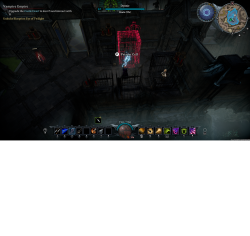
-
02 May, '25
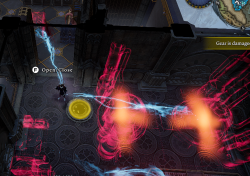
Tidus1324My duo and I are stuck repairing Items in our base that were broken after being raided. This Issue persists through server resets and logging off of the game. This is a Duo PvP server: SoulGuard Survival Main
-
02 May, '25
Eric📋 Describe the Issue: My vampire cannot be killed.
I am stuck in arena mode on Blue team and I cannot die or build
I was doing Arena battles
It started when i was stood in the arena waiting to fight
no modding
🔧 Troubleshooting Steps you have already tried, such as:
-Restart your PC
-Update your graphics card drivers
-Confirm that your PC meets the minimum system requirements
-Reset game settings by deleting the "v1", "v2", "v3", and "v4" folders located at:
%appdata%\..\LocalLow\Stunlock Studios\VRising\Settings
(Copy/paste this path into your File Explorer)
-Verified game files via Steam:
Steam > Right-click on V Rising > Properties > Local Files > Verify Integrity of Game File
🌐 Server Information:
-Is the server: Non-Official Public
-Are you the host? No
🆔 Discord ID for us to reach out: zeman3017 -
03 May, '25
BarzukGrinder doesnt grind flowers to polen. Two times i put several hundreds of flowers to grinder and logged out and i found 0 polen at log in.
-
03 May, '25
David📋 Describe the Issue.
I lost a V4 private server. I have some autosaves from this server but when i try first time to login the server can't connect.
Wanna know if exist any possibility to recover a server from an autosave file.
-What exactly is happening? Lost V4 private server
-What were you doing before the issue occurred? 01/05/25
-Have you modified your game files or installed any mods? No
🔧 Troubleshooting Steps you have already tried, such as:
-Restart your PC
-Update your graphics card drivers
-Confirm that your PC meets the minimum system requirements
-Reset game settings by deleting the "v1", "v2", "v3", and "v4" folders located at:
%appdata%\..\LocalLow\Stunlock Studios\VRising\Settings
(Copy/paste this path into your File Explorer)
-Verified game files via Steam:
Steam > Right-click on V Rising > Properties > Local Files > Verify Integrity of Game File
🌐 Server Information:
-Is the server: Private
-Are you the host? Yes
🆔 Discord ID for us to reach out: sentrock -
04 May, '25
FangFang
📋 Describe the Issue.
game coplitly bricd, after teleport from event lvl2 to my base i tp in to the wall
my eq is broken i dont see map its just black i cant respawn or unstack even admin commands cant do anything my hp is not a number its jut say value/value everything i can do is just open menu....game is runing and ingame time past and on my dead body float FORGE with half load red progers bar and WHIT square inside no E/F
🔧 Troubleshooting Steps you have already tried, such as:
-Restart your PC
-Update your graphics card drivers
-Confirm that your PC meets the minimum system requirements
-Reset game settings by deleting the "v1", "v2", "v3", and "v4" folders located at:
%appdata%\..\LocalLow\Stunlock Studios\VRising\Settings
(Copy/paste this path into your File Explorer)
-Verified game files via Steam:
Steam > Right-click on V Rising > Properties > Local Files > Verify Integrity of Game File
🌐 Serve
-Is the server: Private
-Are you the host? Yes
i dont see my skils also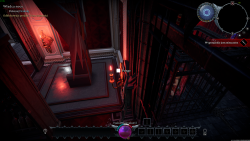
-
04 May, '25
MichaelGood afternoon, dear developers.image.png I am a Ukrainian, I have encountered harassment, racism and fascism on this server, I found a player with the nickname Axel who uses cheats, does not receive damage in pvp, is instantly treated for all health, without leaving the battle, does not burn in the fire of chaos, is not stunned and does not receive other status effects, I contacted the administration servers - they not only did not do anything, but also began to help the cheater and his friends to poison me, gave the go-ahead to violate the rules of the server, the whole server came and destroyed my castle, I ask you to take action against the administration of this server and the player of the cheater Axel and his friend cheater sidera. I sincerely hope that you do not support fascism, racism and harassment not only of Ukrainians, but also of any other people. Soul Realm their discord, from where they also removed me for the truth about their support of cheaters and fascism/racism.
-
05 May, '25
TwCrashing once I load into the world. I've tried reinstalling, deleting cache files, new drivers, old drivers, studio drivers, verifying game files etc.
-
05 May, '25
SamHello!
- I can't put a hedge in a specific spot of my castle. The game says that the environment is blocking the fence, but I manage to put a castle wall in the same place.
- I was making my garden.
- I don't know about the update.
- I don't have any mods in my game.
I would like an explanation, if it should be working that way.
Thank you for your attention!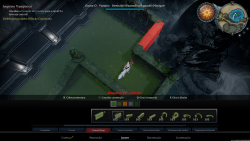
-
05 May, '25
FenixSilvermoonIt is no longer possible to host or join a private session. This issue began after today's hot fix patch, which is Patch 1.1 Hot Fix 3.
Not sure if this message belongs here or whether you're already on it, but I'm taking my chances. :) -
05 May, '25
MattUnmount horse in castle and horse vanishes. it's still at the spot but not rendering on screen. If you remount and dismount again it stays.
Traveling back to castle while mounted
Started with new update adding the new land
No mods added
🌐 Server Information:
-Is the server: Official / Private
-Are you the host? No -
05 May, '25
YaseminAfter the Hot Fix 3, my game crashes after I select 'continue' I get one window with the logo and an exclamation mark, and it says Unity. That's all I can see before it completely crashes. I am the host on a private server.
-
06 May, '25
cindercakesSanguine Coil can be rendered unusable permanently
If someone is given a jewel with:
-Increase maximum charges by 1
-Lethal attacks restore one charge
-Bounces towards an additional target after first hit dealing 29 - 40% of the initial damage or healing.
Can bounce back towards caster.
Then they go into some place with large mobs that can be easily killed, use the ability against the mobs it will eventually reach a point where the spell can no longer be used due to being refreshed too quickly, you can break the spell faster if you have spell charges.
This can be broken on both modded and non-modded servers but you can avoid this bug on modded servers by removing cooldowns but will not fix the spell if it is already broken
Troubleshooting tried:
-Restarted PC
-Verified game files on Steam on all clients and dedicated server
-Uninstalled and Reinstalled the game on all clients and dedicated server
This occurs on a Private Server
Discord ID: assortedcakemix -
06 May, '25
MartynWhat exactly is happening?
After capturing a 100% blood prisoner and feeding them a fish to gain health, I received the "A Perfect Test Subject" achievement.
When did the issue start? Was it after a specific update or event?
I played pre-1.1 and this didn't happen.
Have you modified your game files or installed any mods?
No modifications to the game.
🌐 Server Information:
Official private server as the host. -
06 May, '25
Adam W- Using Admin teleport causes Build actions to become unusable.
- Issue started after 1.1 release on 4/28/25.
- No mods installed.
- Updated GPU drivers, deleted v1-v4 folders, clean install, file verification, restart of computer attempted. No effect.
- Only "fix" so far has been to log out of game, restart gportal server, and log back in. Issue recurs immediately after using *any* teleport command, including ctrl&shift+click on map and other players teleporting me to them.
- Server host: Gportal
- I have admin access to the server
- Recreation steps:
1. Logged in to game.
2. Enabled Adminauth.
3. Placed test floor tile (type irrelevant).
4. Placed map marker.
5. Used teleporttomapmarker.
6. Began clearing plot with darksilver mace and axes.
7.Attempted to place castle heart. Game shows character "holding" the tile with puppet string animation. Placement animation did not play no matter how many clicks.
Additional notes:
- Also unable to move or place stations, decor. -
07 May, '25
QueenLagerthaOn the official Brazil server #8008, players with hanging splinters can teleport. I understand this was never possible. Is this possible in this new update?
-
07 May, '25
QueenLagerthaQueenLagertha (You)
On the official Brazil server #8008, players with hanging shards can teleport. I understand this was never possible. In this new update, is it possible?. This happened when we were fighting the shard carriers near a teleportation point. -
07 May, '25
HarcerzOfficial PvE server on Brutal #1006. No mods.
After building my first Stable and feeding my Vampiric Horse through it some flowers I lost the ability to mount it.
It was like the horse belonged to someone else or like in the wolf form - there was no prompt "F to mount".
The only way to get on it was pressing R in Subdue form. Other horses on the map worked fine.
It was visible on the map as my horse and color was right, I could do everything else (give/take saddle, change name etc) but mount it.
It may be connected to the fact that I unlocked Vampiric Horse a little earlier by interacting with Lvl 3(?) Castle Heart in another player's castle.
It advanced the quest.
Then I skipped the new horserider V Blood and killed him only with some 15 level advantage - build the stable instantly after defeating him.
Before that I had no issue with my Vampiric Horse.
Server restart didn't help.
Ultimately I solved it by killing the horse and subduing another. ;(
RIP "Roach", long live "Roach 2". -
07 May, '25
CesarCan we please fill where the prisoners are facing inside the cell already! Don't want to sound rude because this isn't game breaking, but its annoying how they're all facing the back of the cells, giving their backs to the cell gate or door. Thank you.
-
08 May, '25
MichelleIn the VBlood Tracking "book", Ziva is shown as level 60, but when we go to face her, she's actually level 79.
What were you doing before the issue occurred? We have only gone to see her twice, once on 5/6/2025 - she showed as Red and had a skull. We were at level 60 so she shouldn't have been red. We didn't notice her level then. However, today (5/7/25) we are level 65 so we went back to her. She's still red, no skull, but her level number says 79.
This is the first we've gone to see her. We haven't noticed this with any other boss so far.
No, I haven't edited the game or added any mods. I don't even know how to edit the boss levels at this point.
I restart daily
Video drivers are up to date
My system meets min req. I haven't done the reset, because I didn't know I could. I did change # of floors. What happens to castles with more than default # of floors?
I have verified files via Steam
Private Server that I host -
08 May, '25
Jean-LucAfter the latest hotfix, most of my roads on my private server just turned pitch black. Some near my castle were fine but most roads are pitch black as well as some terrain but not much.
I tried restarting my server to no avail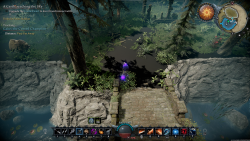
-
09 May, '25
swissi tried to enter my game today and it crashes as i get into the server, i tried pvp server and it crashed again
-
09 May, '25
aklbn adada-What exactly is happening? Breaking down low level gear gives no materials back
-What were you doing before the issue occurred? Normal gameplay
-When did the issue start? Was it after a specific update or event? Noticed it happening few days ago, it can be replicated constaltly.
-Have you modified your game files or installed any mods? no mods, We are on official server -
09 May, '25
seth2 minor bugs i encountered. first was the minion gear level respawn was 0 even tho it had the items so i had to replace the gear for it to recognize the gear
second was trippy mushroom i ate 1 effect was about to wear off about 5 seconds so i ate another one new timer started but no effect -
09 May, '25
ania-What exactly is happening?
Jumped onto broken tile and became the rock (well, not exactly rock)
-What were you doing before the issue occurred?
jumping from the cliff on left of pic
-When did the issue start? Was it after a specific update or event?
current patch hot fix6
-Have you modified your game files or installed any mods?
nope
⚠️ — If yes, remove all mods and reinstall the game
🔧 Troubleshooting Steps you have already tried, such as:
Slightly doubt if related
🌐 Server Information:
-Is the server: Official / Public, Non-Official / Private
official EU-C 1002
-Are you the host? Yes / No
no (oh to be host of official server :wink: :wink:)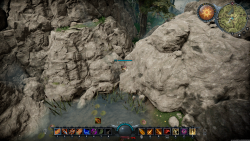
-
09 May, '25
Raul-What exactly is happening?
--The Veil of Chaos is not allowing the recast within the allotment time of the spell. It is just functioning as another Veil.
--The Gems affecting the Veil of Chaos are not functioning, not sure if due to the error stated above.
-What were you doing before the issue occurred?
--Trying to kill Domina the Blade Dancer V Blood.
-When did the issue start? Was it after a specific update or event?
--We checked it on 5/9, prioir the Hot Fix 6 it was functioning
-Have you modified your game files or installed any mods? -
10 May, '25
Aaron Shaffer-What exactly is happening?: Repeated BSODs
-What were you doing before the issue occurred?: Just defeated Ziva. I have been playing off and on all day with no issues. There were no recent game updates or driver updates
-Have you modified your game files or installed any mods?: No
🔧 Troubleshooting Steps you have already tried, such as:
-Restart your PC: Yes, still BSOD.
-Update your graphics card drivers: Yes, after second BSOD.
-Confirm that your PC meets the minimum system requirements.
Ryzen 9 7900x
64 GB RAM
Nvidia RTX 3080
Windows 11
-Reset game settings by deleting the "v1", "v2", "v3", and "v4" folders; Done. Still BSOD.
-Verified game files via Steam: Done. Still BSOD
🌐 Server Information:
Server: Non-Official / Private
-Are you the host? Yes -
13 May, '25
kiannadior-What exactly is happening? i was preparing to upgrade my legendary reaper scythe and deleted the forge meaning to move it.
-What were you doing before the issue occurred? i was moving around the forge and deleted it with the scythe inside and lost the scythe.
-When did the issue start? Was it after a specific update or event? this happened after i deleted the upgrade forge. i then started tossing weapons inside and attempting to delete it but got the errror cannot delete with items inside, so i dont know how it let me delete it with my legendary inside.
-Have you modified your game files or installed any mods? no