Voice chat not working
Voice chat turns off spontaneously. After turning it on again, it works for a couple of minutes and then turns off again. I tried everything: I rebooted my PC/Router, reinstalled the game, and reinstalled all the sound drivers. This problem was found only in V-rizing (voice chats work in other games/applications). All input/output devices in the game are specified correctly. In the Windows OS and firewall have access to the microphone for V-rizing. I first encountered this problem in game version 1.1, a week after the launch. Before that, everything worked fine.
Comments: 5
Oldest
•
Newest
•
Most likes
•
Fewest likes
-
23 Aug, '25
yungxanhoeHighlighted comment
my chat is constantly banned and i cant turn it back on i dont know why but it is annyoing especially when an admin wants me to read server rules i just cant open the chat and go onto the discord server i always need friends and thats a huge issue -
29 May, '25
InsetenI also encounter this problem:
1. After 1 minute the Voice chat option from the SOCIAL tab moves from Proximity to off, and I can switch it from off to proximity.
2. After a little more time it grays out and I cant interact with it anymore, and it also unchecks itself from System - Options - Sound - Enable Proximity Voice chat.
Tried reinstalling the game, the windows, the drivers, no fix found over the internet so far, a lot of complains.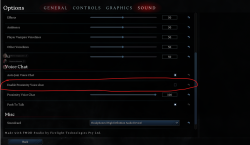
-
12 Jun, '25
doomblazeSame issue here, I keep hoping for it to be addressed on every release of a hotfix
-
17 Jun, '25
InsetenAfter trying a lot of servers I found 1 server where the issue never occurs. (Unfortunately for solo players it is a squad type server)
The name of the server is V World - maybe this can help in fixing the issue since they could.

