Screen calibration/ age verification / gamma adjustments
Every time I launch the game, I have to go through the terms and conditions, age statement, gamma adjustments, every single time i log in
Comments: 7
Oldest
•
Newest
•
Most likes
•
Fewest likes
-
15 May
Kriselle Santos SystemHighlighted comment
"Can't save my gameplay" (suggested by <Hidden> on 2026-05-07), including upvotes (1) and comments (0), was merged into this suggestion. -
11 Apr
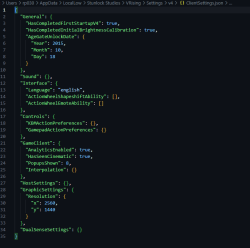
Rajat Mishra MergedI have recently started playing the game again and installed it in a fresh new windows. On the first and second boot, I didn't observe that the information taken is being asked repeatedly and now it has been more than 3-4 days and on literally every boot, I have to do the display calibration, then provide region and birth date details and finally go through the terms and conditions to agree and finally get into the game. Along with these issues, the changes that I do in the settings are also not persistent. I checked the clientsetting.json and there should be a couple of keys in the object there stating that the onboard forms are filled but those keys are not present into my json file. it exists on my friends' system file
-
22 Apr
Kriselle Santos AdminPlease try the following
1. Verify Integrity of Game Files via Steam
2. Manually Update Client Settings (Advanced)
If verifying the game files doesn’t resolve the problem, you can manually set your calibration and age gate preferences:
Close the game completely
Navigate to this folder on your PC:
C:\Users\<YourUsername>\AppData\LocalLow\Stunlock Studios\VRising\Settings\v4
Open the file named ClientSettings.json in a text editor (e.g., Notepad)
At the top of the file, insert or confirm the following section:
"General": {
"EnableConsole": false,
"HasCompletedFirstStartupV4": true,
"HasCompletedInitialBrightnessCalibration": true,
"AgeGateUnlockDate {
"Year": 1941,
"Month": 1,
"Day": 1
Be careful not to alter or remove any other parts of the file to avoid issues with the game.
After saving and restarting the game, it may prompt you once more for your preferences. Once you complete them, your settings should now be retained between sessions. -
22 Apr
Kriselle Santos System"Region Info and birthdate - asks on every boot" (suggested by <Hidden> on 2026-04-11), including upvotes (1) and comments (0), was merged into this suggestion.
-
07 May
Olivier Dubouilh MergedEverytime I open the game, it's still like I open up the game for the first time. Ive started many gameplay, and every time I close the game, it doesn't save. Every time I open the game, there is always the term of service, I always need to confirm my birth date, the region I am playing. Ive created a character every time I want to play
-
09 May
Luka Karkarashvili MergedWhenever i turn off and then turn on the game options are changed to default, and on every log in it requires to choose region and birthdate and stuff
-
15 May
Kriselle Santos System"Options reset" (suggested by <Hidden> on 2026-05-09), including upvotes (1) and comments (0), was merged into this suggestion.
